Budget Journal Access Request Process
To request budget journal access at the University of Houston-Downtown (UHD), complete and submit the UHS Finance Access Form.
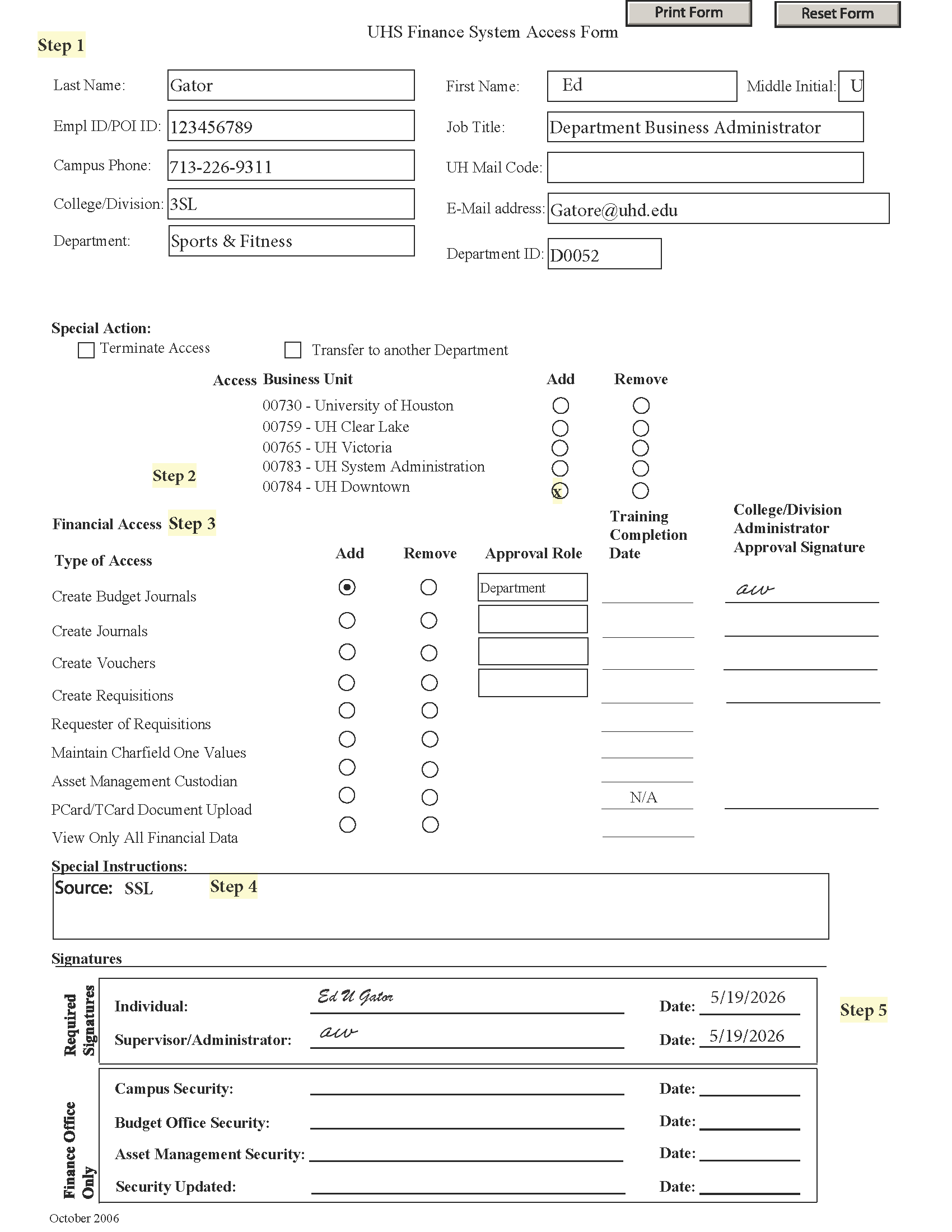
An example of the UHS Finance System Access Form is located below.
Step-by-Step Instructions
Step 1 — Complete Employee Information
- Fill out all required employee information fields located at the top of the form
Step 2 — Select the Correct Access Business Unit
- 00784 – UH Downtown
Step 3 — Select Financial Access
-
- Type of Access - Select: Add - Create Budget Journals
- Approval Role - Select appropriate budget journal approval role:
-
-
- Department — Initiator
-
-
-
-
- Budget journal initiator access
- Cannot approve budget journals
-
-
2. College/Division — Approver
-
-
-
- Budget journal approver access
- Can also initiate budget journals
-
-
3. Obtain the required College/Division Administrator Approval Signature
Step 4 — Complete the Special Instructions Box
Must provide the appropriate Source, based on your home department
Available Source Types:
- BAP — Budget Office
- AAF — Administration & Finance
- ACA — Academic Affairs
- BUS — Marilyn Davies College of Business
- CPS — College of Public Service
- ESO — Human Resources
- HSS — College of Humanities & Social Sciences
- LIB — Library
- PRS — Office of the President
- SAT — College of Sciences & Technology
- SSE — Enrollment Management
- SSL — Student Success & Student Life
- UAV — Advancement & University Relations
Step 5 — Sign and Date the Form
Required Signatures
- Individual/Employee
- Supervisor/Administrator
Step 6 — Submit the Completed Form to the Budget Office
Submit the completed form to budgetoffice@uhd.edu
Step 7 — Budget Office Review
The Budget Office reviews, signs, and forwards the form to the UHD General Accounting Office
Step 8 — Finance Office Review
The UHD General Accounting Office reviews/signs the request and forwards it to UH for processing
Step 9 — Approval Notification
Once approved, the UHD General Accounting Office notifies the Budget Office
Step 10 — Budget Journal Training
The Budget Office contacts the employee to schedule budget journal training
Budget Journal Processing Expectations Based on Roles
Department Role (Initiator) – Has the ability to initiate and submit budget journals
- Budget Journal Initiator Responsibilities
- Reviews & manages cost center budgets
- Processes budget transfers unassociated with positions
- Processes recognize revenue budget adjustments
- Processes fund equity carry forward budget adjustments
- Processes budget swaps between allowable fund types
- Processes non-position related budget adjustments for month-end close
- Ensures timely submissions to meet approval and posting deadlines
- Ensures budget journals are balanced when transferring between budget nodes and cost centers
- Ensures all amounts are supported by adequate backup attached (e.g., 1074 reports, documents, emails) so approvers can verify transactions and approved in a timely manner
- Once budget journal is posted, verifies cost center budgets appear as intended
Role Summary:
The Budget Journal Initiator is responsible for creating and preparing budget journals that accurately reflect planned spending within the department/division approved budget. This role is critical because budget journals form the basis for financial reporting, planning, and compliance.
College/Division Role (Approver) - Has the ability to initiate and submit budget journals and approve budget journals submitted to workflow by department initiators
- Budget Journal Approver Responsibilities
- Review budget journals and backup for accuracy and compliance
- Confirm the budget adjustment complies with applicable policies, fund type rules, and budget constraints
- Validate supporting backup (e.g., 1074 reports, documents, emails)
- Ensure proper workflow and deadlines are met
- Prevent and address erroneous submissions by denying entries and providing explanations when necessary
- Approve budget journals in a timely manner that allows business transactions to continue with little to no interruptions while giving the Budget Office time to review and post in a reasonable timeframe
Role Summary:
The Budget Journal Approver is responsible for reviewing and authorizing budget transfers that move budgets between budget nodes, cost centers, and/or funds. The role is not a “rubber stamp” — approvers must ensure each transaction is accurate, compliant, and complete before approval.
Example: Budget Journal Access Request Form