
BOB Report
What is the BOB Report?
The BOB report (Bolt-on Budget report) is a high-level summary report which displays budget and payroll information by position and cost center, which includes year-to-date earnings, encumbrances and budget balance available (BBA).
Departments should run and review the BOB Report on a monthly basis and reconcile the payroll information with 1074 reports during the monthly cost center verification process, which includes but is not limited to ensuring position budgets are correct and sufficiently cover expected earnings, negatives are addressed, comp rates and earnings are correct and posted against the appropriate cost centers, and cost center totals match between the BOB and 1074 reports.
Each month, UH notifies campus business offices when the BOB report can be run for the month that recently closed.
The UHD Budget Office runs the BOB report and checks for accuracy with Finance reports.
If the BOB and Finance reports match, the UHD Budget Office notifies departments via email to run the newly available BOB report.
Note: Unlike Finance reports such as the 1074 report, the BOB is not a ‘live’ report that captures activity when the report is pulled within the current month. In other words, an accurate and up-to-date BOB won’t be available to run until the university’s financial end-of-month close process is complete. For example, a March BOB report won’t be available to run until approximately 7-10 days into April.
The BOB Report lists the following information:
- Cost center and cost center title
- Employee name and employee ID
- Position title and position number
- Base (Original) Budget and Revised (Current) Budget
- Current month and year-to-date earnings
- Compensation rate (monthly or hourly)
- Earnings encumbrance (open commitment) for each active employee
- Full-time Equivalent (FTE) information (represents percentage of effort)
- Budget Balance Available (BBA)
- Cost center subtotal for budget and payroll information
How to run the BOB Report
Navigation to BOB Report in PeopleSoft HR:
Main Menu > UHS HRMS Budget > Reports > BOB Report
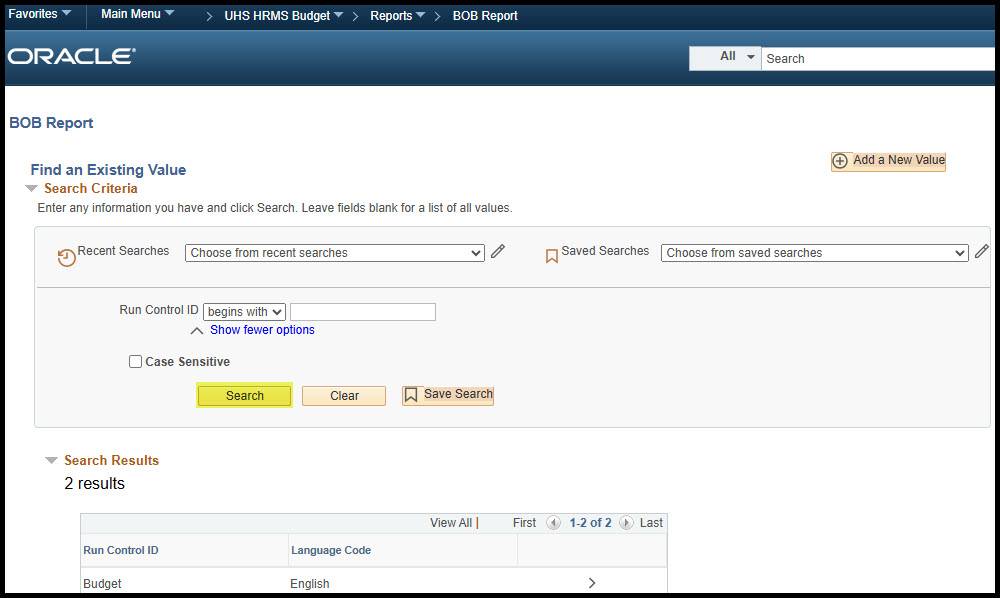
On the “Find an Existing Value” tab, click “Search” to select a Run Control ID
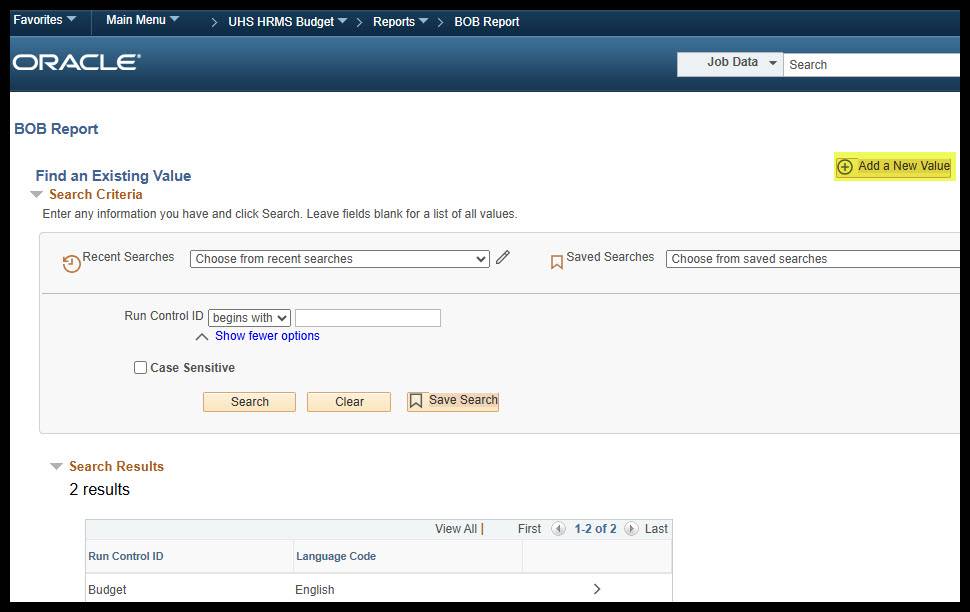
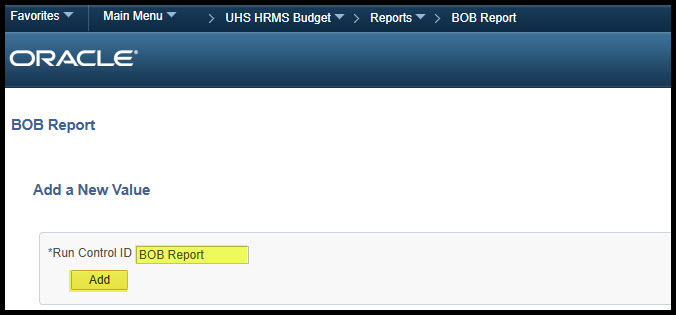
To add a new run control, select “Add a New Value” on the top-right. Enter a name for the run control then click “Add”
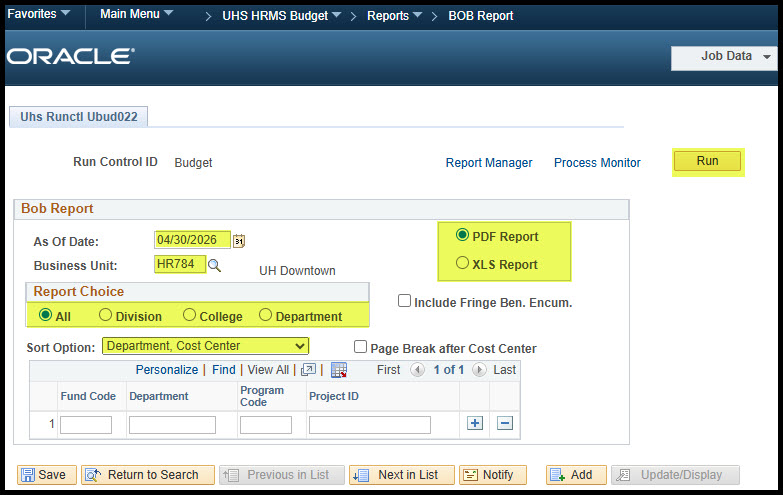
In the date field, enter the last day of the closed month (Ex: 04/30/2026)
The business unit should always be “HR784”
There are four ways to run the BOB report:
- All – Use “HR784”
- Division –department tree node level 3 (D0809 – ADMIN & FINANCE LVL 3)
- College – department tree node level 4 (D0810 – ADMIN & FINANCE LVL 4)
- Department – Use department ID (D0041 BUDGET OFFICE)
It is recommended to sort the BOB report by department then cost center
You may add a page break after each cost center, though it is not necessary
Leave the “Include Fringe Ben. Encum.” box blank
The BOB report may be produced in PDF or Excel format
Once all sections are selected, click “Run”
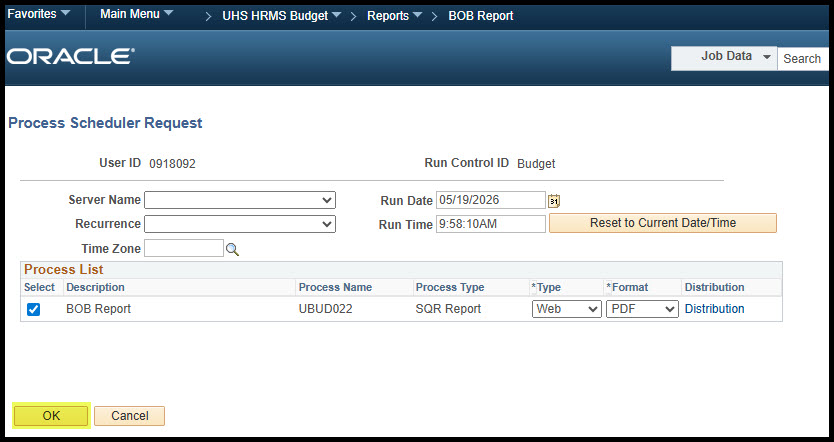
A second page will appear. Click “OK” in the bottom-left corner
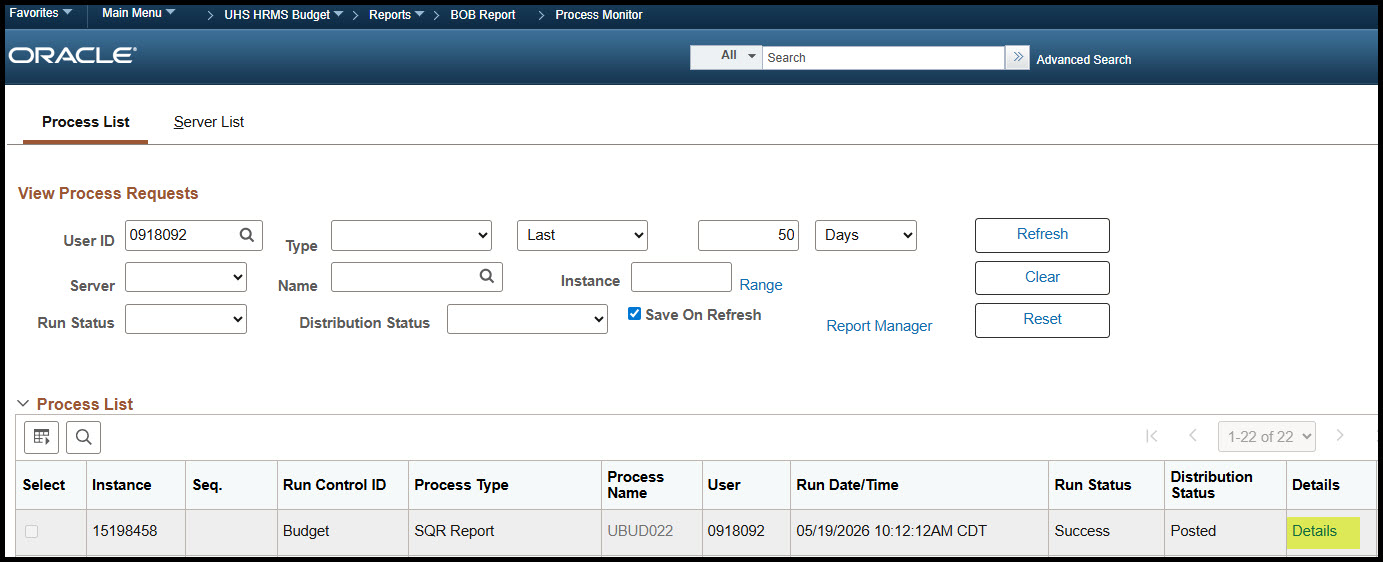
Then click “Process Monitor” in the top-right corner and wait until the run status shows “Success” and the Distribution Status shows “Posted”
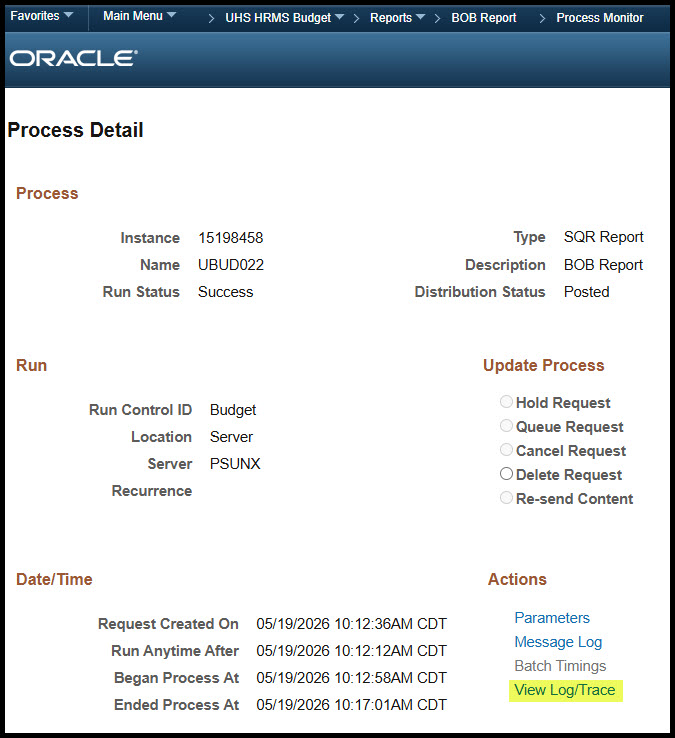
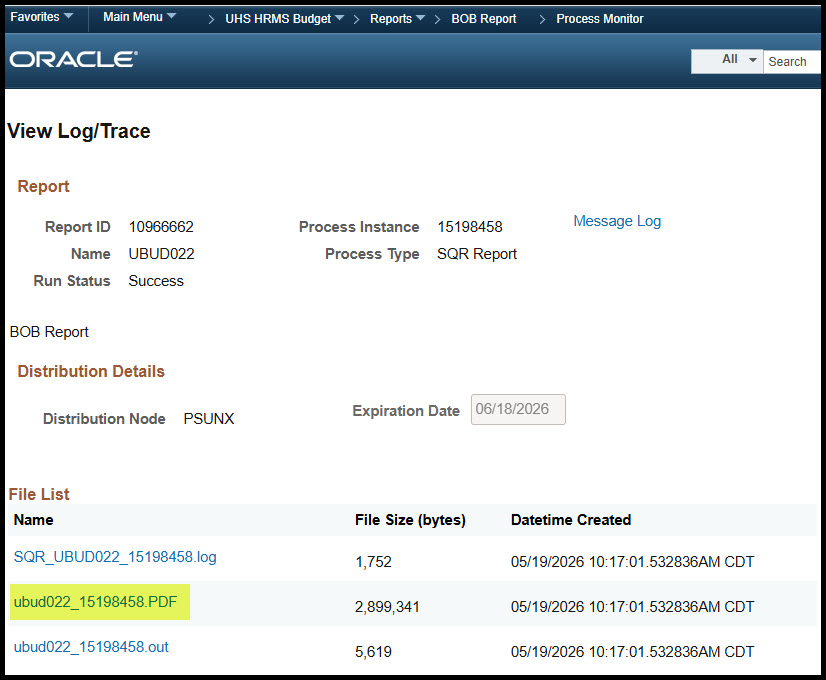
Once the report is successfully posted, click “Details”, then “View Log/Trace” and open the BOB report in PDF or Excel format
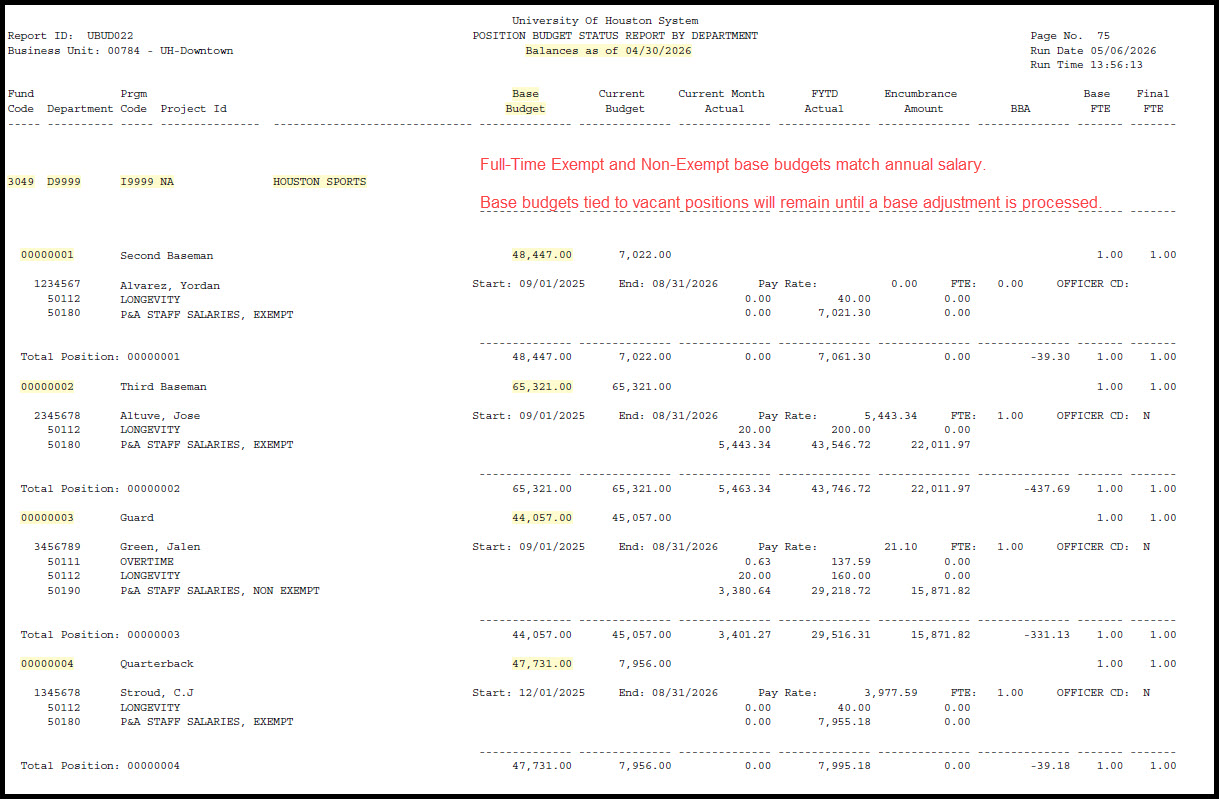
Base (Original) Budget
From a position standpoint, the base budget for full-time faculty and staff positions should be equal to:
The current incumbent’s annual salary if the position is filled, or the previous incumbent’s annual salary if the position is currently vacant.
A position’s base budget should fully cover the employee’s annual salary (round up when calculating a position’s base budget)
For reconciling purposes, make sure all base budgets are correct
Example 1: John Doe is a Department Business Administrator (01010101) earning $4,133.34 per month or $49,600.08 per year
The base budget for position 01010101 should be $49,601 ($4,133.34 X 12 months)
Example 2: Jane Doe is an Administrative Assistant (01010102) earning $21.78 per hour or $45,476.64 per year
The base budget for position 01010102 should be $45,477 ($21.78 per hour X 2,088 work hours per year)
Base budgets for hourly paid positions are based on 2,088 work hours per year
If an employee is split-funded, in other words, the employee’s salary is expected to pay out of more than one cost center, the position’s base budget in each cost center should closely represent the annual salary expected to pay out of each cost center based on the position’s funding distribution percentage
The variance should not exceed $5.00
The position’s total base budget across all cost centers should fully cover the employee’s annual salary
Frequently Asked Question: What does the B00001 Blank Position line mean?
This is the original budget base budget that loaded into the cost center at the beginning of the fiscal year which should match the total S&W budget on the Megabud. It is the sum of all S&W related budget nodes (B5038, B5039, B5040, B5034, etc.) which includes budgets tied to vacant and lump sum positions.
Current (Revised) Budget
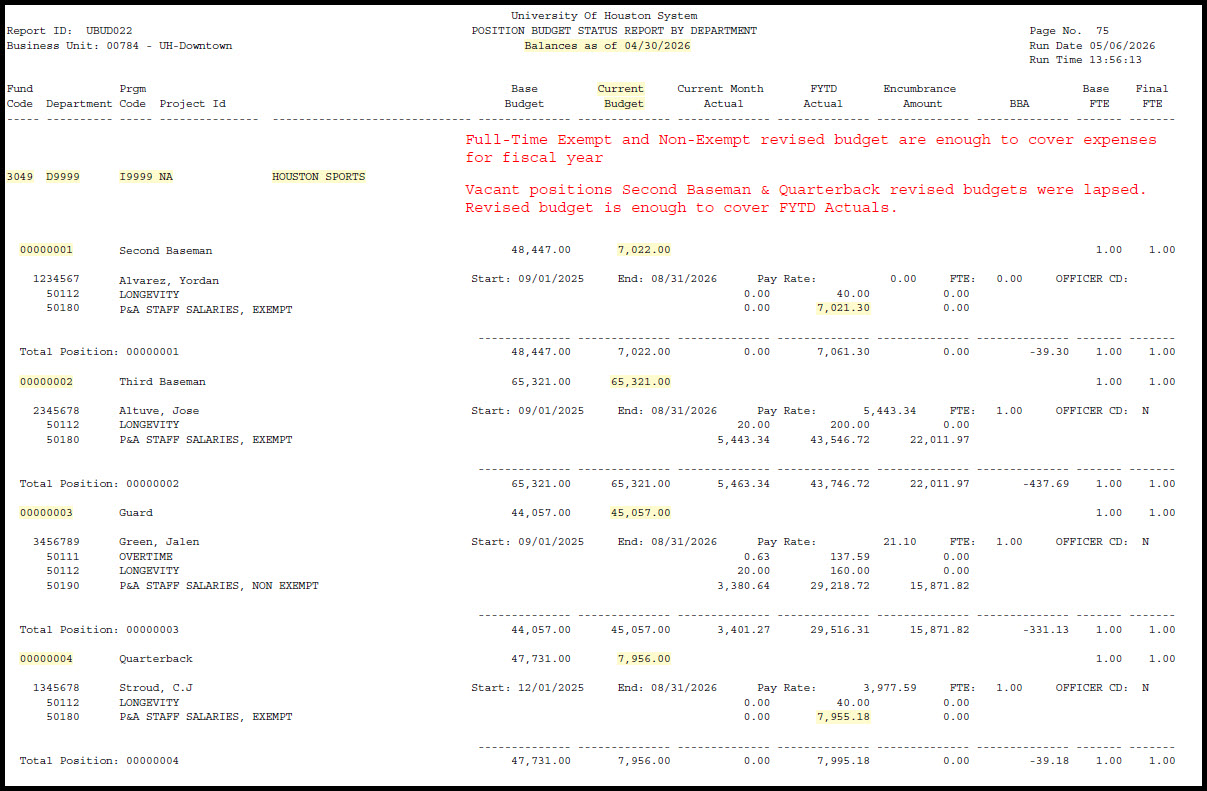
From a position standpoint, full-time faculty and staff revised budgets should represent the employees’ annual salary plus additional one-time compensation for the current fiscal year
A position’s revised budget should fully cover the employee’s expected salary paid (round up when calculating a position’s revised budget)
For full-time and part-time positions, the revised budget should cover salary expenses through the end of the fiscal year
NOTE: Revised budgets tied to vacant positions in fund codes 1041 & 1042 will be lapsed. Budget will be restored via budget journal once the position is filled
Example 1: DBA John Doe (01010101) has an annual salary of $49,601. In addition, John Doe is paid out additional compensation of $100/month from September-February
The revised budget for position 01010101 should be $50,201 ($49,601 + ($100 X 6 months)
Example 2: DBA John Doe (01010101) is terminated effective 01/01/26. Year-to-date payout is $16,533.36
The revised budget should be enough to cover FYTD payout ($33,067). The remaining revised budget ($17,134) will be lapsed to central pool
The variance should not exceed $5.00
The position’s total revised budgets across all cost centers should fully cover the employee’s expected salary earnings for the current fiscal year
Frequently Asked Questions:
What does the 00000000 Blank Position line mean?
The budgets on this line represent both the base and revised S&W-related budget adjustments that have occurred in the cost center up to the month of the BOB.
What does the Unknown line mean?
The budgets on this line, located at the end of each cost center, should represent the net effect of all budget adjustments against the original base budget that loaded at the beginning of the fiscal year. These budgets should tie to the S&W Subtotal line on the first section of the 1074 report.
What is the difference between a Base (Original) and Revised (Current) budgets?
Base (Original) budget is a cost center's permanent budget expected to carry over into the next fiscal year. However, revised (current) budget is a cost center's budget level for the current fiscal year and will not carry over into the next fiscal year.
Current Month Actual
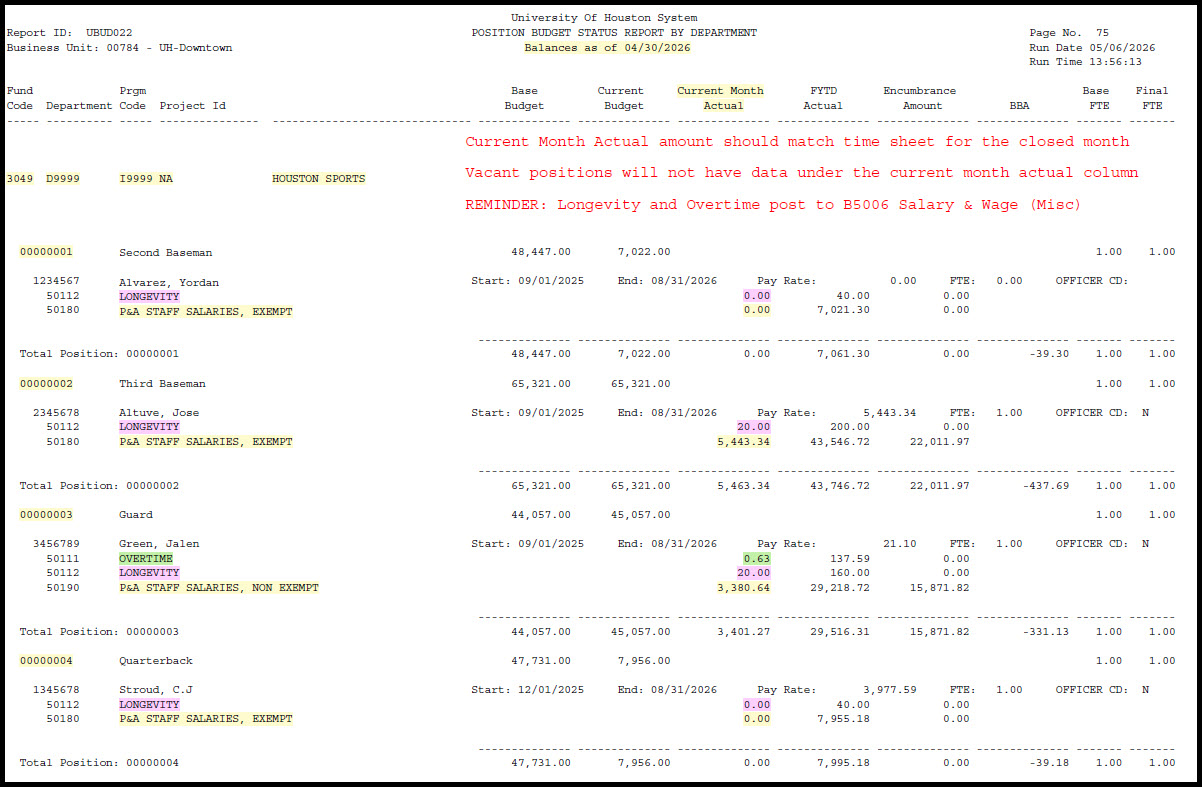
The Current Month Actual column represents the earnings posted in the cost center during the month of the BOB report
Payroll earnings are separated by expense account
Vacant positions will not have earnings under the Current Month Actual column unless there was a previous incumbent in the position at any point during the month of the BOB report
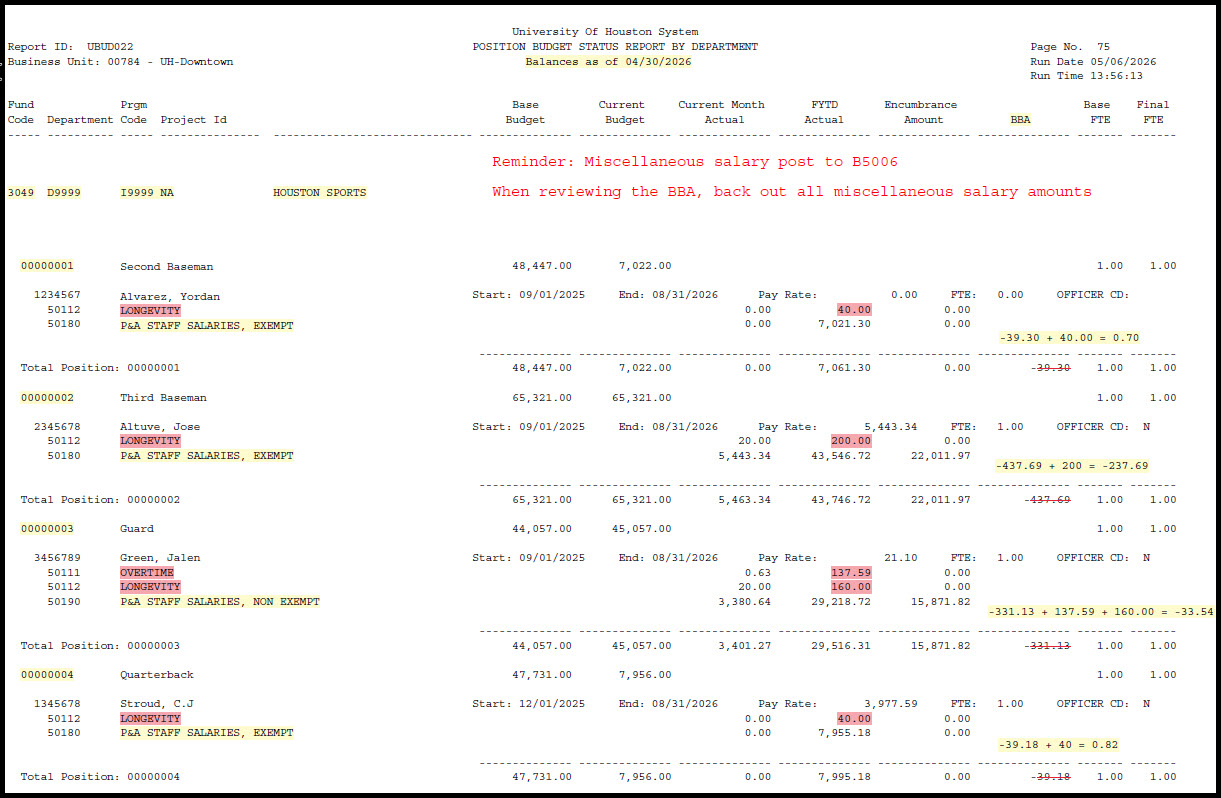
Reminder: Longevity, Overtime, Hazardous Duty Pay, Shift Differential and ERS Opt Out post to B5006 Salary & Wages Misc. Auto allowance posts to B5009 M&O
Current month actuals for Exempt Faculty & Staff typically match the monthly rate
Current month actuals for Non-Exempt Staff should match hours worked within the month. It is recommended to review alongside the time sheet
The following may alter the current month actual: additional compensation, unpaid leave and/or payroll reallocations processed within that month
If an employee is split-funded, in other words, the employee’s salary is expected to pay out of more than one cost center, the position’s revised budget in each cost center should closely represent the annual salary expected to pay out of each cost center based on the position’s funding distribution percentage
FYTD Actual
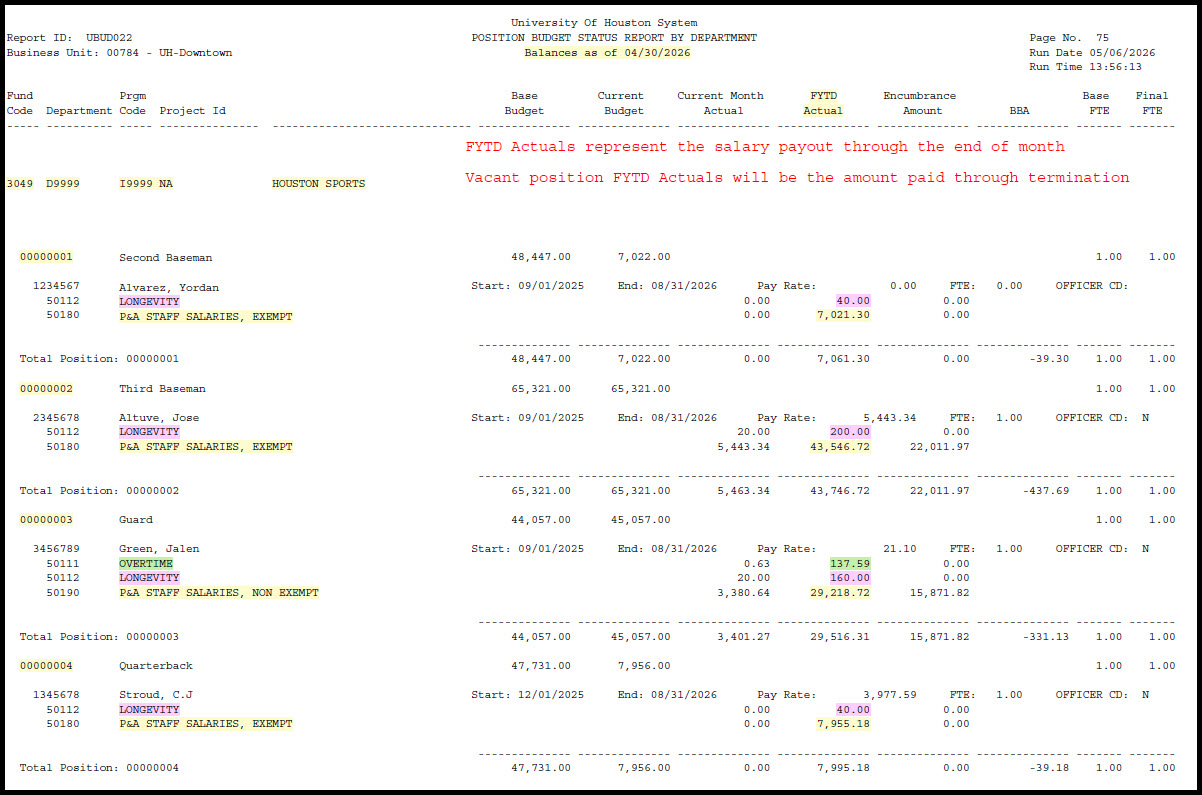
The FYTD Actual column represents the ‘fiscal year to date‘ earnings of each employee in the cost center through the month of the BOB report
Payroll earnings are separated by expense account
The following can alter FYTD earnings: additional compensation, unpaid leave and/or payroll reallocations processed during the fiscal year
The FYTD Actual for employees hired in the middle of the fiscal year should equal the earnings amount from their hire date through the month of the BOB report
The FYTD Actual for employees terminated in the middle of the fiscal year should equal the amount of earnings from the beginning of the fiscal year, or their hire date, through the last day worked (day before termination date)
Encumbrance Amount
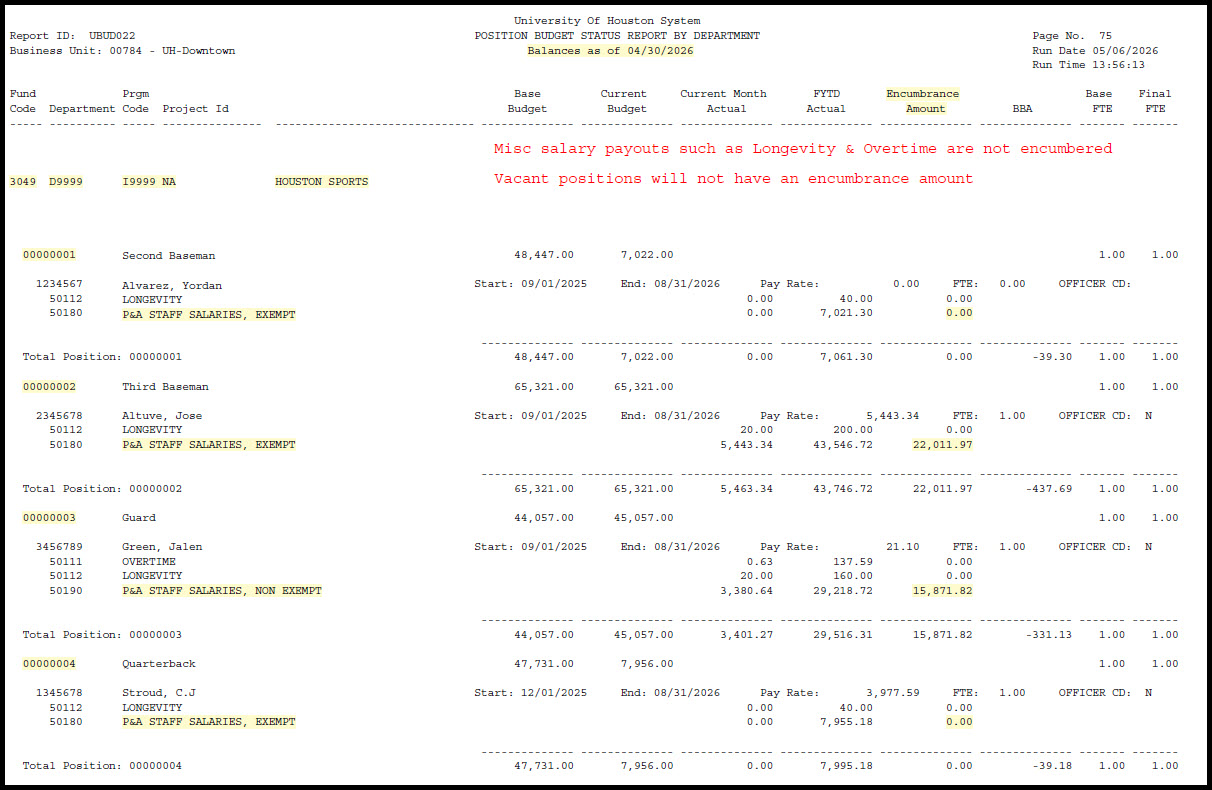
The Encumbrance Amount column represents the earnings calculated to be paid through the remainder of the fiscal year, or up to the employment end date
The BOB report only posts encumbrances, also referred to as open commitments, for regular salary expense accounts (Ex: 50180 P&A Staff Salaries, Exempt) and NOT payroll such as longevity, overtime or additional compensation.
Vacant positions will not have an encumbrance amount
Note: It is common for encumbrance amounts to be slightly inflated by approximately $200. It is uncommon for the encumbrance for each employee to reflect the exact earnings expected to pay out
For example, with a compensation rate of $5,000/month and three months remaining in the fiscal year, the employee’s encumbrance on the May BOB will likely
hover around $15,200 instead of $15,000
Exempt staff encumbrance calculation
Daily rate = Salary X 12 / 365
Encumbrance amount = daily rate X # of days left in the fiscal year
Non-Exempt staff encumbrance calculation
Daily rate = Hourly rate X standard hours X 52 weeks / 365
Encumbrance amount = daily rate X # of days left in the fiscal year
BBA (Budget Balance Available)
Due to an inflated encumbrance, the BBA for each full-time faculty & staff position should be around -$200. The negative may be larger depending on the employee’s annual salary
The revised budget for each position should sufficiently cover the employee’s earnings through the end of the fiscal year or up to their employment end date. As a result, departments should back out all non-regular salary earnings from the BBA shown on the BOB report
Frequently Asked Questions:
What do I need to do if my cost center is negative?
You are responsible for clearing negatives on your BOB. You should contact the Budget Office to help resolve the problem. Encumbrances can cause your report(s) to be negative. For the most part negatives due to encumbrances will resolve themselves as payroll releases. Negatives due to encumbrances are usually $200.
What is longevity?
Longevity is an incentive pay for regular, full-time, non-academic employees that relates to years of service. Faculty with administrative appointments or those who are assigned to full time research in the summer are eligible for longevity pay during these appointments.
How do I release/adjust a payroll encumbrance?
To release a payroll encumbrance an ePAR needs to be processed to terminate the employee(s) from the position. To adjust a payroll encumbrance, an ePAR needs to be processed to increase/decrease work hours or Full-Time Equivalent (FTE) for the employee(s).
Are fringe benefits included as part of the salary and wages budget?
No, fringe benefits are budgeted separately using a B5007 budget node.